Community Content
Vehicle Specific Kits
Whether you're an off-road enthusiast or a professional looking to streamline your vehicle’s electrical system, sPOD delivers seamless integration with factory fitments and an unmatched factory-finished look. Designed to simplify power management, sPOD offers solutions that eliminate the need for cumbersome relays, wiring looms, and circuit fuses, making it one of the simplest and most reliable solid-state power control systems on the market.Built for Your NeedsThe BantamX and SourceLT units feature cutting-edge solid-state technology through sGuard, delivering up to 30 amps per circuit and 100 amps of total continuous power. This provides reliable power management for your accessories without the hassle of traditional relays and fuses. Plus, with the added protection of Low Voltage Cutoff (LVCO), your battery is safeguarded from damage by automatically shutting down electrical components when voltage drops too low.sPOD offers two powerful and space-saving systems: the eight-circuit BantamX and the six-circuit SourceLT. Each system features robust solid-state technology to provide continuous power, flexibility, and reliability, allowing you to easily power a broad range of 12-volt accessories. Bluetooth connectivity through the sPOD app on Android and iOS lets you wirelessly control your system from your smartphone, giving you freedom and convenience.Tailored Solutions for Every Adventure VehiclesPOD offers vehicle-specific kits for Jeep, Ford, Toyota, Can-Am, Polaris UTVs, and Mercedes Sprinter vans. These kits are designed to integrate seamlessly into your vehicle’s cabin for a factory-installed look and functionality, offering multiple configurations to meet your needs. sPOD also offers universal power management solutions for non-vehicle specific kits, giving the option to add sPOD to any vehicle on the road today.
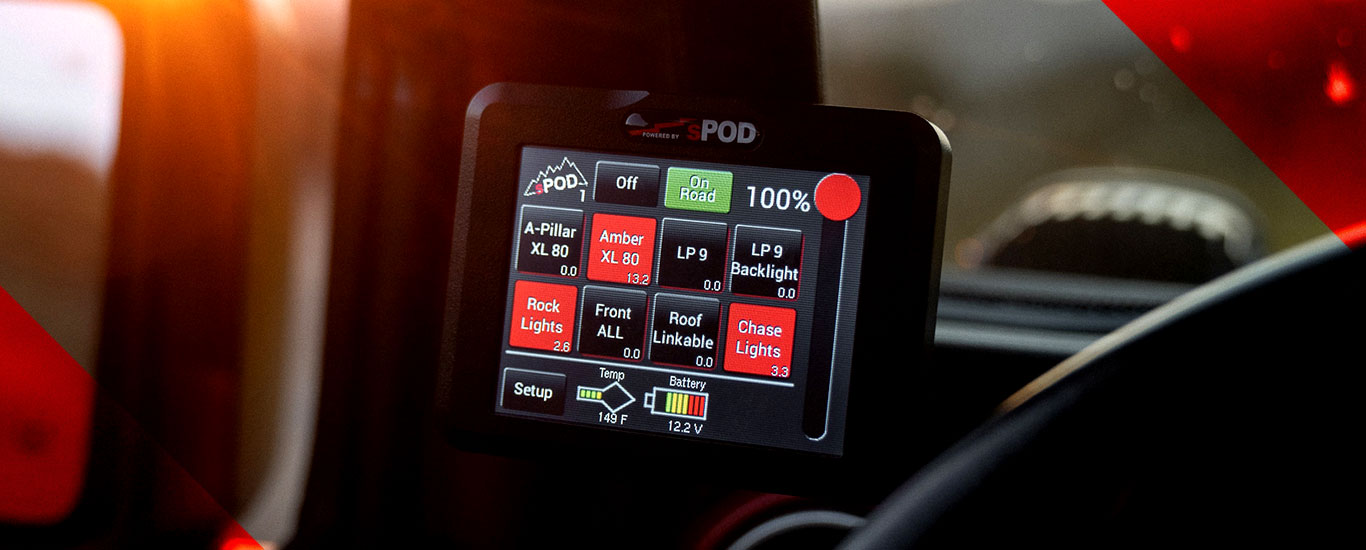
Ford F-250/350 Super Duty (2023-on)BantamX Upfitter Kit - The sPOD BantamX Upfitter power management system for the 2023-on Ford F-250/350 Super Duty is specifically engineered to integrate with the factory upfitter switches of these vehicles. With 8 power circuits, each delivering 30A and a total capacity of 100A, this plug-and-play system is designed to fit seamlessly into the customer’s truck. This kit offers the customer the use of OEM upfitter switches to trigger the BantamX while increasing amp ratings across the first four switches to 30A. Customers will gain two to four extra switches, depending on configuration. The addition of Bluetooth functionality through the sPOD app: output dimming, strobing, flashing, switch memory, auto power-up, momentary settings, switch linking, and more. This Upfitter kit will also omit the need to run a controller cable through the vehicle firewall.BantamX/Touchscreen or HD Smart Panel Kit – Designed to mount into the sunglass holder of the upper console, this kit includes the BantamX with 8 circuits of power each at 30A per channel, 100A total for power distribution. Customers can choose from the digital Touchscreen controller, or the HD smart panel controller with tactile feedback buttons.SourceLT/Mini6 Kit - The SourceLT offers 6 circuits of power each at 30A per channel, 100A total for power distribution along with the Mini6 controller with tactile feedback buttons.
Ford F-150/Raptor (2021-on)BantamX/Touchscreen or HD Smart Panel Kit – Designed to mount the controller into the sunglass holder of the upper console, this kit includes the BantamX with 8 circuits of power each at 30A per channel, 100A total for power distribution. Customers can choose from the digital Touchscreen controller, or the HD smart panel controller with tactile feedback buttons.SourceLT/Mini6 Kit - The SourceLT offers 6 circuits of power each at 30A per channel, 100A total for power distribution along with the Mini6 controller with tactile feedback buttons. This kit is also designed to mount the Mini6 into the sunglass holder of the upper console.
Toyota Tundra (2022-on)BantamX/Touchscreen or HD Smart Panel Kit – This kit for the 2022-on Toyota Tundra includes the BantamX with 8 circuits of power each at 30A per channel, 100A total for power distribution. Customers can choose from the digital Touchscreen controller, or the HD smart panel controller with tactile feedback buttons.SourceLT/Mini6 Kit - The SourceLT/Mini6 kit for the 2022-on Toyota Tundra offers 6 circuits of power each at 30A per channel, 100A total for power distribution along with the Mini6 controller with tactile feedback buttons.
Can-Am Maverick RSteering Wheel Kits - sPOD offers two steering wheel kits for the Can-Am Maverick R; the BantamX/HD Steering wheel kit or the SourceLT/Mini6 Steering wheel kit. Both kits have been engineered to seamlessly integrate into the steering wheel of the Can-Am Maverick R, giving power to control up to 8 accessories, each with 30A per channel, 100A for total power distribution. Mounted directly onto your steering wheel, the sPOD steering wheel kits place accessory controls at your fingertips. A simple thumb swipe allows you to focus on driving without distractions, ensuring ultimate convenience and safety.Center Console Kits - With two console kits for enthusiasts to choose from, BantamX/HD or the SourceLT/Mini6, these console kits allow access of up to 8 channels for accessories, each with 30A per channel, 100A for total power distribution. Designed to integrate into the cabin seamlessly while providing a safe place to access all of your controls.
Polaris RZR Pro RSteering Wheel Kits - The sPOD SourceLT/Mini6 steering wheel kit has been engineered to seamlessly integrate into the steering wheel of the Polaris RZR Pro R, giving power to control up to 6 accessories, each with 30A per channel, 100A for total power distribution. Mounted directly onto your steering wheel, the sPOD steering wheel kits place accessory controls at your fingertips. A simple thumb swipe allows you to focus on driving without distractions, ensuring ultimate convenience and safety.Center Console Kits - With two console kits for enthusiasts to choose from, BantamX/Carling Switch or the SourceLT/Carling Switch, these console kits allow access of up to 8 channels for accessories, each with 30A per channel, 100A for total power distribution. Designed to integrate into the cabin seamlessly while providing a safe place to access all of your controls.Roof Mount Kit - The BantamX/HD Smart Panel roof mount kit has been engineered to mount the control panel on the roof bar of your Pro R while having your BantamX tucked away at the lower foot panel. With 8 channels for accessories, each with 30A per channel, 100A for total power distribution.
Mercedes Sprinter Van (2019-on)BantamX/HD Smart Panel Kit – Engineered to integrate the HD smart panel controller in the sunglass holder of the upper console, the mounting plate has been designed at the perfect angle to access switches easily. Includes the BantamX with 8 circuits of power each at 30A per channel, 100A total for power distribution. Customers can choose from the digital Touchscreen controller, or the HD smart panel controller with tactile feedback buttons
Jeep JL/JT/JK/TJ/LJBantamX/Touchscreen or HD Smart Panel Kit – Designed with a specific engine bay mounting plate for the BantamX, each system has 8 circuits of power each at 30A per channel, 100A total for power distribution. Customers can choose from the digital touchscreen controller, or the HD smart panel controller with tactile feedback buttons. Specially designed kits for the Jeep 392 V8 are also available. SourceLT/Mini6 Kit - The SourceLT offers 6 circuits of power each at 30A per channel, 100A total for power distribution along with the Mini6 controller with tactile feedback buttons. This kit comes with a specific engine bay mounting plate.BantamX/SourceLT Wireless Switch Controller Kit - Designed to be paired with the sPOD app on your Android or iOS device, the sPOD wireless controller kit allows the freedom to control accessories how you want. With Bluetooth capability allowing users to control their accessories without being tethered to the vehicle.Engineered to Take ControlsPOD is a leading innovator in vehicle power management solutions, dedicated to enhancing the driving experience for enthusiasts, adventurers, and professionals alike. With a commitment to quality, performance, and innovation, sPOD has earned a reputation as a trusted partner for automotive power control management systems backed by an industry-leading 5-year warranty. Let sPOD give you the power of control.